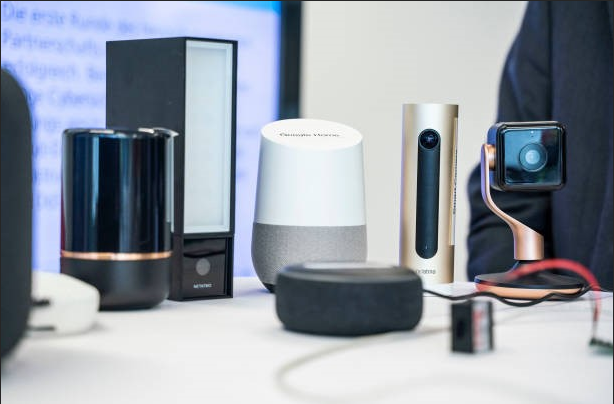
Smart home technology is making everyday living more convenient,
But how much personal information are these connected devices collecting behind the scenes?
From smart cameras and voice assistants to connected lighting and security systems, modern homes now rely heavily on internet-connected technology. While these devices offer automation and convenience, they can also create privacy and security concerns if users are not careful. That is why following a proper device privacy checklist has become essential for every smart home shopper.
Understanding how devices handle data, permissions, and network access can help users make safer purchasing decisions while protecting personal information in an increasingly connected digital environment.
Key Takeaways
- Review app permissions before setup
- Choose devices with regular software updates
- Use strong passwords and two-factor authentication
- Secure your home Wi-Fi network
- Avoid unsupported or low-quality smart devices
Why Smart Home Privacy Matters
Connected devices constantly exchange information via Wi-Fi, cloud servers, mobile apps, and Bluetooth. Depending on the product, this information may include:
- Voice recordings
- Device usage habits
- Camera footage
- Location data
- Account information
- Wi-Fi network details
Without proper safeguards, poorly secured devices can become entry points for hackers or expose sensitive personal information.
A reliable device’s privacy checklist helps shoppers identify products that prioritize security rather than only convenience or marketing features.
9 Connected Devices Privacy Checklist for Smart Home Shopper
- Software Updates Matter
Smart devices require ongoing software updates to fix vulnerabilities and improve protection against newer cyber threats. Devices that stop receiving updates become increasingly risky over time.
Before buying any connected product, shoppers should research:
- How often updates are released
- Whether updates install automatically
- How long the manufacturer supports the device
Reliable brands usually provide clear information about software maintenance policies. This is especially important for consumers using modern travel gadget products that connect directly to personal devices and home networks.
- Avoid Unsupported Products
Cheap smart home products sometimes lose support quickly after release. Unsupported devices may continue functioning normally while silently becoming less secure.
This is especially important for products connected directly to home networks, such as:
- Cameras
- Smart doorbells
- Voice assistants
- Security systems
- Smart locks
- Review App Permissions Carefully
Many Devices Request More Data Than Necessary
Some smart devices request excessive permissions inside their mobile apps. For example, a lighting product may request access to contacts, location data, or microphones without a clear reason.
A good device privacy checklist includes reviewing:
- Camera access
- Microphone permissions
- Location tracking
- Bluetooth permissions
- Cloud storage settings
Users should disable unnecessary permissions whenever possible.
Limit Data Collection
Many connected products allow users to adjust privacy settings after setup. Consumers should review these options carefully rather than automatically accepting all default settings.
- Use Strong Passwords and Two-Factor Authentication
Weak Passwords Remain a Major Security Problem
One of the most common smart home security mistakes is using simple passwords or reusing the same password across multiple accounts.
Every connected device account should use:
- Unique passwords
- Long password phrases
- Password managers when possible
Enable Two-Factor Authentication
Whenever available, two-factor authentication adds an extra layer of protection by requiring an additional verification step during login attempts.
This small step greatly improves smart home security.
- Secure Your Home Wi-Fi Network
Smart Devices Depend on Wi-Fi Security
Even secure devices become vulnerable if connected to weak home networks. A strong Wi-Fi setup is one of the most important parts of any device’s privacy checklist.
Consumers should:
- Change default router passwords
- Use WPA3 or WPA2 encryption
- Disable unused remote access features
- Regularly update router firmware
Separate Smart Devices From Main Devices
Some homeowners create a separate guest network specifically for smart devices. This helps reduce risk if one device becomes compromised.
- Understand Cloud Storage and Data Sharing Policies
Many smart products automatically upload recordings or activity data to cloud servers. Consumers should understand:
- What information is stored
- How long data is retained
- Whether data is shared with third parties
- Whether recordings can be deleted permanently
Reading privacy policies may feel tedious, but it helps shoppers make more informed decisions.
Choose Brands with Transparent Policies
Trustworthy manufacturers clearly explain how customer data is handled and protected.
- Check Physical Security Features Too
Smart Security Requires Physical Protection
Digital privacy matters, but physical security still plays an important role inside smart homes. Many connected products work best when combined with practical home protection tools.
For example:
- Smart entry systems work better alongside quality cabinet locks
- Outdoor monitoring systems benefit from durable security lighting
- Charging stations should remain organized and protected
Combining physical and digital security creates a more complete protection strategy.
- Avoid Overloading Your Home with Unnecessary Devices
More Devices Mean More Security Risks
Many people purchase connected products simply because they are new or heavily advertised. However, every additional connected product increases potential security exposure.
A smart device’s privacy checklist includes evaluating whether a device genuinely improves daily life before adding it to the network.
Consumers should avoid unnecessary connected products that offer little practical value.
- Be Careful with Public Charging and Smart Accessories
Charging Devices Can Also Create Risks
Many modern households use connected charging systems, wireless charging pads, and USB hubs. While convenient, some low-quality charging accessories may introduce security or safety risks.
Consumers should prioritize:
- Certified charging products
- Reliable manufacturers
- Proper surge protection
- Safe electrical standards
Avoiding unknown accessories helps reduce device damage and network vulnerabilities.
Conclusion
As smart homes continue to grow in popularity, protecting personal information has become just as important as choosing convenient technology features. A proper device privacy checklist helps shoppers understand how connected devices collect, store, and share sensitive data before bringing them into their homes.
From smart cameras and voice assistants to wireless charging accessories and security systems, every connected product can introduce privacy risks if not managed carefully.
By reviewing software updates, app permissions, Wi-Fi security, and data-sharing policies, consumers can make smarter buying decisions and create a safer, more secure smart home environment for everyday use.
FAQs
How often should smart home devices be updated?
Smart devices should receive updates whenever manufacturers release them. Automatic updates are usually the safest option.
Are cheap smart home products less secure?
Not always, but very low-cost products sometimes lack long-term software support and strong security protections.
Can smart devices work without cloud storage?
Some devices offer local storage options, but many connected products rely partly on cloud services for remote access and advanced features.
Is it safe to buy used smart home devices?
Used devices can create security risks if previous accounts, settings, or permissions are not fully removed before setup.
Why is network separation useful for smart homes?
Separating smart devices onto a guest network helps reduce security risks if a single connected device becomes compromised.
Should travelers turn off smart devices while away?
Not necessarily, but travelers should ensure remote access settings are secure and monitor device activity carefully while away from home.