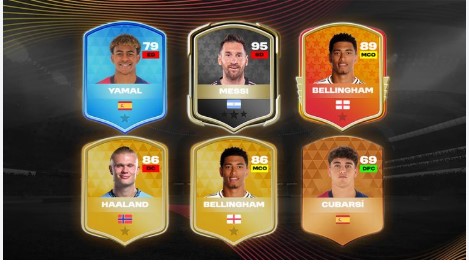
Quick answer: The DLS 26 Card Creator is a tool that lets you design custom player cards for Dream League Soccer 2026. You can choose card backgrounds, add player photos, set ratings and stats, and export your finished design to share online or use in your own content. Most creators use it to mock up dream signings, build fantasy squads, or make eye-catching graphics for social media.
If you play Dream League Soccer 2026, you already know how much the player cards matter. They’re the first thing you see when you scout a new signing, and a great card can make a good player feel legendary. That’s exactly why the DLS 26 Card Creator has become so popular with the community.
This guide walks you through what the Card Creator does, how to use it step by step, and a few tips to make your designs stand out. Whether you want to recreate your favorite real-life star or invent a brand-new wonderkid, you’ll find everything you need below.
What is the DLS 26 Card Creator?
The DLS 26 Card Creator is a design tool built around the player card style used in Dream League Soccer 2026. Instead of waiting for the game to assign a card, you build your own from scratch.
You pick the card rarity or tier, drop in a player image, type in a name, and adjust the stats and overall rating. The result looks like an official in-game card, ready to download or post. It’s handy for content creators, fans who love customizing their squads, and anyone who enjoys the design side of football gaming.
What can you do with the Card Creator?
The tool packs more options than you might expect. Here are the main things it lets you control:
- Card tier and background: Choose from different card styles, from common bronze-style cards to rare, premium designs.
- Player photo: Upload your own image or use a placeholder. Cutout images with transparent backgrounds usually look cleanest.
- Name and club: Add the player’s name, nationality flag, and club badge for an authentic feel.
- Ratings and stats: Set the overall rating along with individual attributes like pace, shooting, passing, and defending.
- Position: Label the card with a position such as ST, CM, or GK.
- Export: Save your finished card as an image file to share or store.
How to create a custom card step by step
Making your first card takes only a few minutes. Follow these steps:
Step 1: Pick your card tier
Start by choosing the background or tier that fits the player you have in mind. Save the flashiest designs for your highest-rated stars—it makes the overall rating feel earned.
Step 2: Add the player photo
Upload a clear, high-resolution image. For the best look, use a photo where the player is cut out from the background. This helps the image blend smoothly into the card design.
Step 3: Enter the details
Type in the player’s name, then add their nationality and club. These small touches make the card feel official rather than generic.
Step 4: Set the ratings and stats
Adjust the overall rating and the individual attributes. Try to keep the numbers believable—a balanced card looks more convincing than one with maxed-out stats everywhere.
Step 5: Export and share
Once you’re happy, download the card as an image. From there, you can post it on social media, drop it into a video thumbnail, or save it for your own collection.
Tips for designing cards that stand out
A few small habits separate a decent card from a great one:
- Use transparent cutouts. Clean player images make the biggest visual difference.
- Match stats to the player. A pacey winger should have high pace; a target striker should lean on shooting and physicality.
- Keep text readable. Don’t overcrowd the card with extra details that clutter the design.
- Stay consistent. If you’re building a full squad, use the same tier and style so the set looks unified.
Why fans love the Card Creator
Custom cards add a personal layer to Dream League Soccer 2026. Some players use the Card Creator to imagine transfers that haven’t happened yet. Others build entire fantasy teams or recreate classic lineups from years past. Content creators rely on it for thumbnails and graphics that grab attention.
The appeal comes down to creativity. The game gives you the pitch—the Card Creator gives you the freedom to design who plays on it.
Start building your dream squad
The DLS 26 Card Creator is a simple way to bring your football imagination to life. Pick a tier, add a photo, dial in the stats, and you’ve got a card that looks straight out of the game. Start with one player, experiment with the design options, and before long you’ll have a full custom collection worth showing off.
Frequently asked questions
Is the DLS 26 Card Creator free to use?
Most versions of the Card Creator are free to use online. Some may offer extra templates or premium card styles, but the core features—building and exporting a card—are typically available at no cost.
Can I use real player photos in my cards?
You can upload any image you like for personal use. Keep in mind that real player photos may be subject to copyright, so be careful when sharing cards publicly or using them commercially.
What image format works best for player photos?
PNG files with transparent backgrounds work best, since they let the player image blend into the card design cleanly. High-resolution photos also produce sharper, more professional results.
Do custom cards work inside Dream League Soccer 2026?
The Card Creator is a design tool, so the cards it makes are images rather than playable in-game items. You can use them for graphics, social posts, and squad planning, but they don’t replace the cards within the game itself.
Who should use the DLS 26 Card Creator?
The Card Creator suits anyone who enjoys the design side of football gaming—content creators making thumbnails, fans mocking up dream transfers, and players who want to build custom fantasy squads.