Introduction
In today’s digital economy, cashless transactions have become the norm, and receiving a digital payment receipt is vital for maintaining accurate records. Whether it’s through UPI, net banking, or credit card payments, having a receipt ensures you can track your financial data. With Bajaj Pay, an easy-to-use, BBPS-enabled platform available on the Bajaj Finserv App and website, managing digital receipts is now effortless. Plus, all payments on Bajaj Pay, including recharges or bill payments, come with zero fees and zero convenience charges.
If you want to save a receipt for money received, a transaction receipt, or a paid bill receipt, Bajaj Pay makes the process seamless and secure.
What is a digital payment receipt and how does Bajaj Pay make it easier?
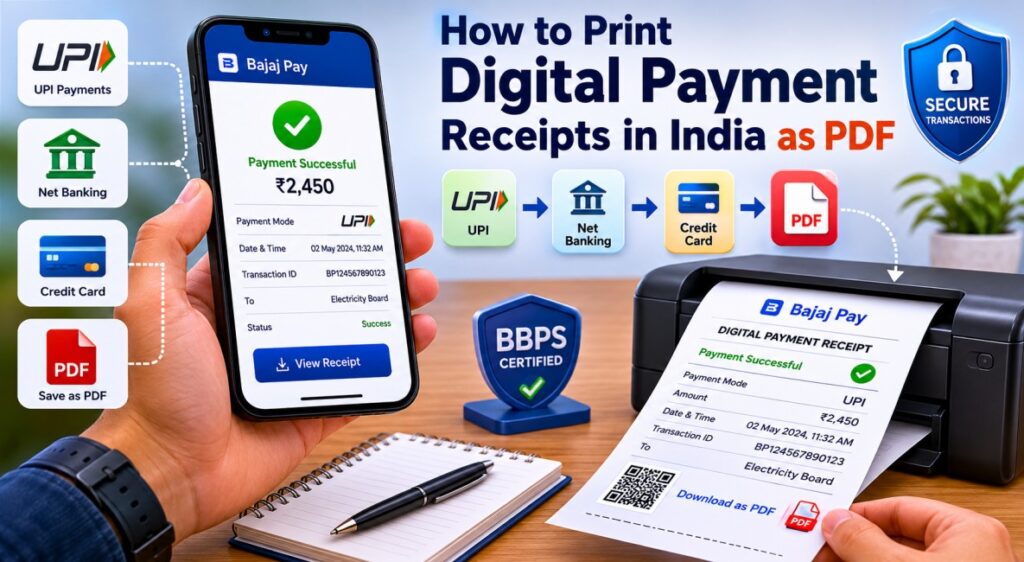
A digital payment receipt is an electronic acknowledgment of money transferred, a bill paid, or a service procured. It contains transaction details such as the payment amount, date and time, payment mode (UPI, net banking, or credit card), and unique transaction ID, making it essential for record-keeping and resolving disputes.
Bajaj Pay, available via the Bajaj Finserv App and website, makes accessing, managing, and printing transaction receipts incredibly simple. Whether you’ve just paid a bill receipt, received money through UPI, or completed an online purchase via a credit card, Bajaj Pay ensures that users get instant digital receipts for every transaction. Thanks to its BBPS-enabled infrastructure, Bajaj Pay ensures secure transactions at zero fees, making it a preferred platform for digital payments, recharges, and money transfers.
In addition to this, Bajaj Pay enables users to download or save receipts in PDF format for offline access or sharing. No more worrying about lost receipts—your records are only a few taps away.
Key highlights of digital payment receipts
- Electronic proof of completed transactions
- Useful for record-keeping and dispute resolution
- Supports UPI, net banking, and credit card payments
- Can be downloaded and stored in PDF format
- Easy access through Bajaj Finserv App and website
Features of digital receipt management on Bajaj Pay
Here’s what makes managing your digital payment receipts on Bajaj Pay effortless.
BBPS-certified and RBI-regulated platform
Ensures secure payment processing and trusted digital transactions.
Zero charges
No fees or convenience charges on transactions.
Available on both Bajaj Finserv App and Bajaj Pay website
Provides convenient access anytime and anywhere.
Multiple payment modes
UPI, net banking, debit card, and credit card are supported.
Instant confirmation with digital receipts
Users receive immediate transaction acknowledgements after successful payments.
Easy-to-download payment paid receipts in PDF format
Receipts can be saved for offline use and future reference.
Comprehensive biller and service provider network
Ensures wide coverage for various payment needs.
Auto-pay feature
Allows seamless recurring bill payments without manual intervention.
24×7 access
Enables uninterrupted bill payments and record management.
Top 5 scenarios where you can print a digital payment receipt on Bajaj Pay
Here are the five most common transactions where saving a digital payment receipt is vital, easily done through Bajaj Pay.
1. Electricity bills
- Service: Pay electricity bills for various state utilities.
- Coverage: Available Pan India for all major electricity providers.
- Benefits: Instant confirmation and ability to set up auto-payment.
2. Mobile recharge
- Service: Recharge prepaid or pay postpaid bills for major telecom operators like Airtel, Jio, and Vi.
- Coverage: Nationwide networks and major data plans.
- Benefits: Real-time receipt generation for seamless tracking.
3. Credit card bill payment
- Service: Use UPI, debit card, or net banking to clear credit card dues.
- Coverage: Major banks and financial institutions.
- Benefits: Instant confirmation, no additional charges.
4. Money transfers
- Service: Transfer funds via UPI or net banking to any bank account in India.
- Coverage: Over 90+ banks supported.
- Benefits: Generate and save transaction receipts for reference.
5. FASTag recharge
- Service: Recharge your FASTag account for toll payments.
- Coverage: Compatible with major FASTag providers and toll booths nationwide.
- Benefits: Save fuel receipts directly from the app upon crossing tolls.
Things to keep in mind before printing a digital payment receipt
Before downloading or printing a paid bill receipt or transaction receipt, ensure the following for a smooth experience.
Double-check biller and operator details
Always verify the payment details before confirming the transaction.
Ensure successful payment confirmation
Look for instant confirmation on Bajaj Pay before downloading receipts.
Keep transaction details handy
Maintain important information such as consumer numbers, transaction IDs, or mobile numbers.
Use the auto-pay feature
Avoid missing recurring payments with automated bill payment options.
Check offers and rewards regularly
Maximize transaction benefits through Bajaj Pay offers and cashback opportunities.
Maintain a stable internet connection
Ensure uninterrupted payment processing and receipt downloads.
Save receipts immediately
Download your digital payment receipt as a PDF to avoid losing important records.
Benefits of paying through Bajaj Pay
Bajaj Pay stands out with a host of benefits for all payment needs, including seamless receipt management.
1. Zero fees and charges
Bajaj Pay ensures complete transparency by waiving off all hidden fees, such as convenience charges. This ensures you only pay the amount due, with no extra costs.
2. Rewards and cashback
With Bajaj Pay, you can enjoy exclusive cashback deals, exciting offers, and rewards points on eligible transactions across categories.
3. Secure and trusted platform
Operated under a BBPS and RBI-approved network, Bajaj Pay ensures end-to-end encryption, making your digital payments safe and reliable.
4. All-in-one platform
Manage bill payments, mobile recharges, FASTag, and money transfers from a single app, eliminating the hassle of juggling multiple platforms.
5. Instant confirmation and downloadable receipts
Every transaction on Bajaj Pay comes with real-time confirmation and the option to save receipts in PDF format, ensuring secure record-keeping.
How to print a digital payment receipt on Bajaj Pay
Follow these simple steps to download and print your digital payment receipt from the Bajaj Finserv App or Bajaj Pay website.
Via Bajaj Finserv App
Step 1
Open the Bajaj Finserv App on your smartphone.
Step 2
Log in using your registered mobile number or create an account if you’re a first-time user.
Step 3
Navigate to the relevant section—Bill Payments, FASTag, or Money Transfers.
Step 4
Select your recent transaction or enter transaction details such as the payment ID or account number.
Step 5
Confirm the transaction and look for the option to view or download the transaction receipt or digital payment receipt.
Step 6
Save the receipt as a PDF or share it via email for future usage.
Via Bajaj Pay website
Step 1
Visit the Bajaj Pay website on your browser.
Step 2
Log in with your details or register if accessing the website for the first time.
Step 3
Head to the relevant transaction history section by selecting a payment category.
Step 4
Select the specific transaction for which you need a receipt.
Step 5
Click on Download Receipt to save the document as a PDF. You can print it using your connected printer.
Conclusion
Printing or saving a digital payment receipt is a smart way to keep track of payments, safeguard against disputes, and simplify financial management. Bajaj Pay, with its zero fees, robust security, and user-friendly platform, ensures seamless receipt management for all transaction types—be it UPI transfers, net banking, or credit card payments.
So why wait? Start paying bills and managing your payment receipts with ease. Download the Bajaj Finserv App or visit the Bajaj Pay website today!