Technology continues to change how homeowners and businesses manage property security. Traditional keys remain widely used, but smart locks provide additional ways to control entry through keypads, mobile applications, and compatible electronic credentials. Professional smart lock installation in Los Angeles can help property owners upgrade their locking hardware while maintaining convenient and secure access.
Smart locks are available in different designs and configurations. Understanding their features, compatibility requirements, and installation considerations can help you select a suitable system for your property.
What Is a Smart Lock?
A smart lock is an electronic locking device that allows users to control door access through digital methods in addition to, or sometimes instead of, a traditional key.
Depending on the model, available features may include:
- PIN code entry.
- Smartphone-controlled locking and unlocking.
- Temporary access codes.
- Bluetooth connectivity.
- Wi-Fi connectivity.
- Activity notifications.
- Integration with compatible smart home platforms.
Not every smart lock offers all these features. It is important to review the manufacturer’s specifications before purchasing a device.
Benefits of Installing Smart Locks
Smart locks can offer practical advantages for people who want more flexible access management.
Convenient Keyless Entry
Keypad and smartphone-based systems can reduce the need to carry traditional keys. Users can enter an authorized code or use a compatible mobile application.
This can be particularly useful for households with multiple residents.
Temporary Access for Guests
Certain smart locks allow owners to create temporary entry codes. This can help manage access for visitors, cleaners, maintenance professionals, and other authorized individuals.
Temporary credentials can be restricted or deactivated when they are no longer needed.
Remote Access Features
Some Wi-Fi-enabled smart locks allow users to manage entry remotely through compatible applications.
This feature depends on the device, network connection, account configuration, and manufacturer support.
Activity Notifications
Selected models provide notifications or activity records showing certain locking and unlocking events.
These features can help property owners monitor access, although notifications should not be treated as a replacement for a complete security system.
Important Considerations Before Smart Lock Installation
Choosing a smart lock requires more than selecting an attractive design. The device must be compatible with the door and suitable for your security requirements.
Check Door Compatibility
Smart locks are manufactured for different door thicknesses, backsets, and locking configurations. Before purchasing, measure the existing hardware and check the manufacturer’s compatibility requirements.
Evaluate Connectivity
Some smart locks use Bluetooth, while others support Wi-Fi or additional communication technologies.
Bluetooth models may require the user to be nearby, whereas remote management may require Wi-Fi connectivity or a compatible hub.
Consider Battery Life
Most electronic smart locks rely on batteries. Check battery life estimates, low-battery notifications, and emergency power or backup entry options.
Review Security Features
Look for reputable manufacturers, secure authentication methods, software update support, and clearly documented security practices.
A smart lock should be treated as part of your overall property security strategy.
The Smart Lock Installation Process
Professional installation helps ensure that the locking mechanism and electronic features operate correctly.
A typical installation process may include:
- Inspecting the existing door: The technician checks door dimensions, lock configuration, and hardware condition.
- Selecting a compatible device: The appropriate smart lock is chosen according to the door and required features.
- Preparing the installation area: Existing hardware is removed when necessary, and the door is prepared according to manufacturer instructions.
- Installing the lock: The electronic and mechanical components are fitted and aligned.
- Configuring digital features: Authorized users, access codes, and supported connectivity options are configured.
- Testing operation: The technician checks locking, unlocking, keypad functions, and backup access procedures.
Smart Locks for Residential Properties
Homeowners may find smart locks useful for managing access without distributing multiple physical keys.
Families can create individual access codes, while property owners may provide temporary credentials to authorized visitors.
For households considering a wider security upgrade, [residential locksmith in Tarzana] is another relevant service topic.
Smart locks can also complement traditional security measures such as deadbolts, reinforced strike plates, and properly maintained door frames.
Smart Locks for Commercial Properties
Businesses can use compatible smart locking systems to manage access to offices, meeting rooms, and other controlled areas.
However, commercial properties may require more advanced access management features, particularly when multiple employees need different permissions.
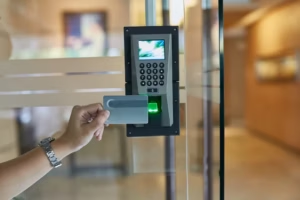
In these situations, businesses can compare [commercial key card systems in Los Angeles] to determine whether a card-based solution better suits their operational requirements.
How to Choose a Smart Lock Installation Professional
Before hiring an installer, consider:
- Experience with the smart lock brand and model.
- Understanding of residential or commercial door hardware.
- Knowledge of electronic configuration.
- Applicable California licensing requirements.
- Clear pricing and service estimates.
- Proper testing and user instructions.
A professional should also explain the limitations of the device and how to access the property if batteries or connectivity fail.
Frequently Asked Questions
1. Can smart locks be installed on existing doors?
Many smart locks are designed to fit existing doors, provided the measurements and locking configuration are compatible.
2. Do smart locks work without Wi-Fi?
Some smart locks support local keypad or Bluetooth operation without Wi-Fi. However, remote features may require an internet connection.
3. Are smart locks secure?
Security depends on the device’s design, authentication features, software support, installation quality, and user practices.
4. What happens when a smart lock battery dies?
The available backup method depends on the model. Some devices provide low-battery alerts or emergency power options, while others offer mechanical key access.
5. Can multiple people use one smart lock?
Yes. Many models support multiple users and individual access codes, subject to the device’s user capacity.
Conclusion
Lock & key pros in Los Angeles provides property owners with an opportunity to modernize traditional door security through electronic access features. By evaluating compatibility, connectivity, battery requirements, and security capabilities, you can choose a locking solution that supports everyday convenience. Professional installation and proper configuration further help ensure that the system operates as intended