Summary:
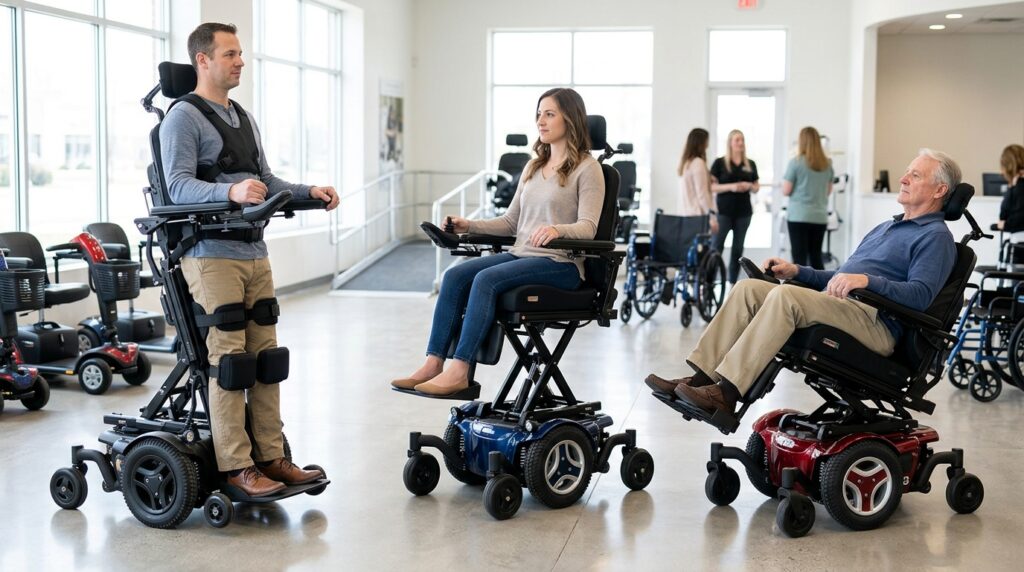
Standing, seat-elevating, and tilt-in-space power wheelchairs offer different positioning functions that support mobility, daily activities, and individual care needs. Understanding how each system changes body position helps users and clinicians identify the features that best support functional access, pressure management, posture, and comfort.
Power wheelchairs can do much more than move. Positioning features let users change posture, reach different surfaces, ease sitting discomfort, and take part in activities that might otherwise feel out of reach. Standing, seat elevation, and tilt-in-space each serve a distinct purpose, so choosing the right function starts with understanding what each one does and which needs it addresses.
Understanding the Three Power Wheelchair Functions
Standing, seat elevation, and tilt-in-space are separate powered positioning functions. Some wheelchairs offer one function, while others combine several to meet an individual’s needs.
What Is a Standing Power Wheelchair?
A standing power wheelchair uses an integrated mechanism and positioning supports to raise the user safely out of a seated position and into an upright one. When clinically appropriate, supported standing can improve access to raised surfaces, assist with daily activities, enable weight-bearing, and support rehabilitation.
However, standing requires careful attention to bone health, joint movement, blood pressure, skin integrity, and postural stability. It does not suit every power wheelchair user.
What Is a Seat-Elevating Power Wheelchair?
A seat-elevating power wheelchair raises the user vertically while they remain seated. This helps them reach shelves and countertops, talk at eye level, and line up for some transfers. Depending on the chair and the user’s abilities, it can also support activities at home, at work, and in the community.
Seat elevation does not provide the lower-limb weight-bearing that supported standing offers. Its main purpose is to improve access and functional reach while the user stays seated.
What Is a Tilt-in-Space Power Wheelchair?
A tilt-in-space system tilts the seat and backrest together, keeping the angle between them fixed while it supports the user. It can redistribute pressure, support posture, and help people who can’t shift their weight independently change position. It may also reduce fatigue and improve sitting tolerance.
Tilt differs from recline. Recline changes the angle between the seat and backrest, while tilt changes the orientation of the entire seating system. This distinction matters when selecting equipment for pressure management and positioning.
Standing vs Tilt-in-Space Wheelchair Differences
Standing vs tilt-in-space wheelchair differences matter most when the main goal is supported upright activity or repositioning while seated. Although both functions change body position, they address different clinical and practical needs. The table below adds seat elevation for a complete comparison.
| Feature | Standing function | Seat elevation | Tilt-in-space |
| Main movement | Seated to supported upright position | Entire seat rises vertically | Seat and backrest tilt together |
| Primary purpose | Supported standing and upright access | Functional reach and seated access | Positioning and pressure redistribution |
| Lower-limb weight-bearing | May be provided, depending on the user and positioning | No standing-related weight-bearing | No standing-related weight-bearing |
| Pressure management | Changes loading but does not replace a pressure plan | Not a substitute for prescribed pressure relief | Can redistribute pressure when used correctly |
| Transfer assistance | Depends on ability and chair design | May help align seat heights for selected transfers | May assist positioning but does not guarantee easier transfers |
| Main considerations | Standing tolerance, bone health, alignment, safety | Reach requirements, stability, operating limits | Seating support, pressure needs, posture, tilt angle |
The most suitable function depends on the user’s goals and clinical needs. Someone who needs to reach a kitchen counter may benefit from seat elevation, while a person who cannot shift their weight independently may need tilt. Standing becomes an option when supported upright positioning adds functional or clinical value.
Benefits of Seat-Elevating Power Chairs
The benefits of seat-elevating power chairs center on access, independence, and participation while seated. Extra height helps users complete activities that call for a higher working position without standing.
1. Improved Reach and Access
Seat elevation can help users reach surfaces that would otherwise sit out of reach, supporting household tasks, work, and community participation. The benefits depend on the chair’s elevation range, the user’s arm function, and surface height. Always follow the manufacturer’s instructions when operating the chair with the seat raised.
2. More Comfortable Social Interaction
Raising the seat closer to eye level can make face-to-face conversations feel more comfortable and help users join in at counters or tables designed for standing adults. The benefit depends on the setting and personal preference. Seat elevation improves access in many situations, but it cannot make every building or public space accessible.
3. Assistance With Selected Transfers
Raising the seat can align a wheelchair with a bed, chair, or other transfer surface, which eases some transfers once the user and care team have established a safe method. It does not replace training or guarantee safe transfers without help. Consider the person’s abilities, the destination surface, chair stability, and any manufacturer restrictions.
Pressure Relief: Tilt vs Recline Wheelchair Functions
Understanding pressure-relief tilt vs. recline wheelchair functions is essential for people who spend long periods seated or can’t reposition independently. Both functions help with positioning, but they redistribute body weight differently.
How Tilt Supports Pressure Redistribution
Tilt-in-space moves the seat and backrest together, shifting some weight onto other supported areas. How well it redistributes pressure depends on tilt angle, cushion, posture, and individual tissue response. Small angles may not provide enough relief, so seek clinical guidance on the right range.
Tilt can also help users keep a more stable relationship between the pelvis and backrest while changing position. It should form part of a personalized pressure management plan, not replace skin inspections or suitable seating support.
How Recline Changes Position
Reclining opens the angle between the seat and backrest, which allows posture changes, rest, and certain positioning needs. Combined with other powered functions, it can also support personal care. However, recline can cause sliding and increase friction, shear, and pressure-related risks for some users.
The order in which a user operates tilt, recline, and leg elevation can affect positioning. A rehabilitation professional should establish the safest technique for each individual.
When Both Functions May Be Useful
Some users need both tilt and recline because their needs go beyond a single type of position change. The combination can support pressure management, comfort, postural needs, or specific care routines.
The right configuration depends on the person’s clinical presentation, available movement, seating system, and ability to operate the controls. More features don’t automatically lead to better outcomes, so each function should serve a clear purpose.
Comparing Power Wheelchair Positioning Functions for Individual Needs
When comparing power wheelchair positioning functions, start with daily activities and clinical goals instead of the number of available features. A therapist or assistive technology professional can help determine which functions offer meaningful benefits.
1. Identify the Main Functional Goal
Identify the hardest tasks first. Reaching a work surface, shifting position to relieve pressure while seated, and standing with support are distinct goals that call for different equipment. Consider the user’s home, workplace, transport, and ability to operate controls, as each affects how useful a function will be.
2. Assess Medical and Postural Requirements
The clinical team may assess trunk stability, joint range, skin, pain, circulation, fatigue, and pressure injury risk to identify suitable positioning functions and precautions. People with complex seating needs may benefit from an equipment trial to check comfort, alignment, function, and safety before the team finalizes the prescription.
3. Consider Controls and Equipment Compatibility
Controls should be accessible and manageable for the intended user. Some individuals may need alternative switches, customized control placement, or caregiver assistance.
The team should also check that the chosen functions work with the right cushions, supports, headrests, leg rests, and other seating components. Compatibility and safe operation matter as much as the positioning feature itself.
Clinical Indications for Wheelchair Seating Functions
The clinical indications for wheelchair seating functions vary by individual. A clinician may recommend a feature to support a documented medical need, improve functional access, or address a specific positioning difficulty.
- Standing: May suit users when supported upright positioning meets defined functional or clinical goals and the person can safely tolerate the position.
- Seat elevation: May help when extra seated height improves functional reach, access, or selected transfer tasks.
- Tilt-in-space: May help people who need assisted weight shifting, postural support, or pressure redistribution.
- Recline: May suit users when changing the seat-to-back angle supports specific positioning, comfort, or care needs.
- Combined functions: May make sense when one function cannot fully meet the person’s documented requirements.
A clinician should determine the right configuration based on the individual’s assessment findings and goals. Never base equipment selection on diagnosis alone, and make sure users receive instruction on operating each prescribed function safely.
Explore power wheelchair mobility solutions with Redman Power Chair and discover the positioning features that support your daily mobility goals.
FAQs
1. Is standing better than seat elevation?
Neither is better for everyone. Standing offers supported upright positioning, while seat elevation improves reach without standing. The right choice depends on individual needs and clinical suitability.
2. Can tilt-in-space replace a standing function?
No. Tilt-in-space changes the angle of the seating system while the user remains seated. It does not provide the upright posture or weight-bearing that standing offers.
3. Does reclining provide the same pressure relief as tilt?
No. Tilt and recline affect posture, pressure, and shear differently. A clinician should select the angles and functions that suit each user.
4. Can one power wheelchair include standing, elevation, and tilt?
Yes, some models combine several powered positioning functions. The Redman Power Chair Chief 107-ZRx, for example, stands, tilts, reclines, and elevates in a single mid-wheel drive chair. Any model you consider must still accommodate the user’s needs, positioning requirements, and safe operating limits.
5. Does insurance cover powered positioning features?
Coverage depends on the insurer, plan, documentation, and medical necessity criteria. Medicare, for example, began covering power seat elevation for eligible users in 2023 but still treats the power standing feature as noncovered. Confirm the specific requirements for each requested feature before purchasing.
Final Thoughts
Standing, seat elevation, and tilt-in-space each serve a different purpose in power wheelchair positioning. Standing supports an upright position, seat elevation improves access while seated, and tilt helps change posture and redistribute pressure. Recline adds another option for specific needs. A professional assessment helps users identify the right combination of features, understand their limits, and make informed equipment decisions.
Planning your next chair? Redman Power Chair can help you explore standing wheelchair insurance funding considerations as part of your equipment planning.