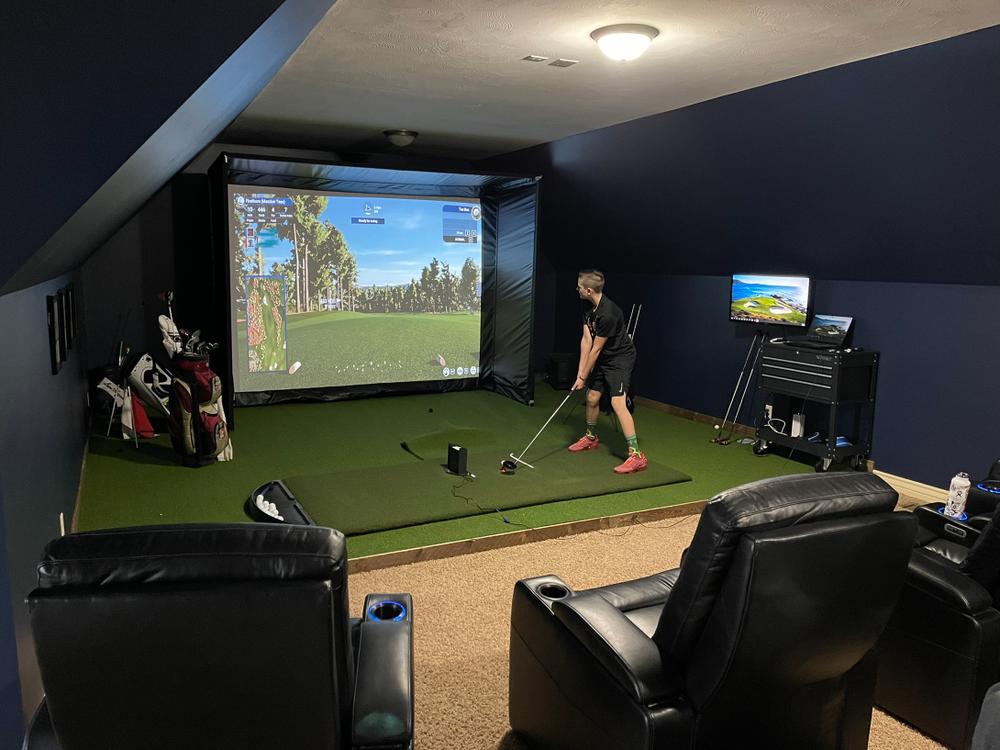
A home golf simulator can turn a garage, basement, spare room, or dedicated entertainment space into a year-round place to practice and play. Instead of waiting for good weather or booking time at a golf facility, golfers can work on their swing, analyze shot data, and enjoy virtual courses from home. However, building a successful setup involves more than buying a launch monitor and projector. Room dimensions, impact protection, hitting surfaces, software, and equipment compatibility all need to work together.
Start by Measuring Your Available Space
Before purchasing any golf simulator equipment, measure the room carefully. Ceiling height, width, and depth can determine whether you can comfortably swing a driver and which type of simulator configuration will work. Many home-simulator guides recommend around 9–10 feet of ceiling height, while roughly 12 feet or more of width and 16–20 feet of depth can provide a more comfortable experience.
Don’t measure only the empty floor area. Check for ceiling fans, lights, beams, shelves, doors, and other obstacles that could interfere with a golf swing. It is also important to consider the golfer’s position relative to the screen and the space required behind the hitting area.
Choose a Suitable Golf Enclosure
Once the room has been measured, the next priority is protecting the surrounding space. A quality golf simulator enclosure provides a dedicated hitting area while helping contain errant shots and supporting an impact screen for projected images.
SimSpace Golf is one option worth considering when planning this part of a home setup. The brand offers golf enclosures and practice nets in different sizes, making it easier to match the equipment to the available room. Its range includes compact options as well as larger configurations for golfers who want a more immersive simulator environment.
For golfers comparing equipment costs, checking available SimSpace discount codes can also be useful before purchasing an enclosure or practice net. The goal should be to choose a properly sized enclosure rather than simply selecting the largest model available.
Select the Right Impact Screen or Practice Net
The screen is more than a surface for displaying a virtual course. It must withstand repeated golf-ball impacts while maintaining an image suitable for simulator play. A high-quality impact screen can make a noticeable difference in both safety and visual experience.
If your main objective is practice rather than full virtual-course gameplay, a golf practice net may be enough. SimSpace Golf offers practice nets in different dimensions, including options designed for indoor and outdoor use. Some configurations can also be paired with an impact screen for simulator applications.
When selecting a net or screen, consider ball speed, available clearance, installation method, durability, and how frequently the setup will be used.
Pick a Launch Monitor
The launch monitor is effectively the brain of a golf simulator. It measures information from each shot and sends that data to compatible software. Depending on the device, golfers may receive information such as ball speed, launch angle, carry distance, spin, club speed, and other performance metrics.
There are two broad approaches to tracking: camera-based and radar-based systems. Camera-based units can be practical in rooms where depth is limited, while radar systems may require additional space for accurate tracking.
Instead of choosing a launch monitor solely because it has impressive specifications, check its placement requirements first. Your room dimensions should influence the model you select.
Invest in a Quality Golf Hitting Mat
A golf simulator needs a reliable hitting mat because golfers will take hundreds or even thousands of swings from the same area. A poor-quality mat can become uncomfortable and may not provide a realistic stance or club interaction.
Look for a mat with sufficient thickness, stable construction, and a surface designed for repeated golf practice. It should also sit securely on the floor so it does not move during the swing.
For frequent practice, durability matters just as much as appearance. A good mat can help create a consistent hitting position and make longer simulator sessions more comfortable.
Add a Projector and Display System
If you want a traditional immersive simulator, you will need a projector and impact screen. The projector should match the screen’s dimensions and the available throw distance. An incorrectly positioned projector can create shadows, distorted images, or an image that fails to fill the screen properly.
Short-throw and ultra-short-throw projectors can be particularly useful in rooms where space is limited. However, projector selection should be based on the entire room layout rather than brightness or resolution alone.
If projection is not necessary, a monitor-based setup can offer a simpler alternative. This can be useful for golfers who prioritize practice data over a large virtual display.
Choose Golf Simulator Software
Hardware alone does not create the complete simulator experience. Golf simulation software connects the launch monitor with virtual courses, practice modes, shot analysis, and other features.
Before subscribing or purchasing software, confirm that it supports your chosen launch monitor. Also consider whether you want realistic course play, driving-range practice, multiplayer features, performance analytics, or coaching tools.
For a family or social setup, multiplayer functionality may be especially valuable. For serious practice, detailed shot data and training features may matter more.
Don’t Forget Lighting, Flooring, and Safety
A polished simulator room requires attention to details beyond the main equipment. Proper lighting can improve visibility without interfering with the projected image. Darker, controlled lighting is often useful for projection-based systems.
Flooring should also be stable and comfortable. Depending on the room, you might use rubber flooring, carpet, artificial turf, or another suitable surface around the hitting area.
Safety should remain a priority. Golf balls can travel at significant speeds, so make sure the enclosure, screen, netting, and protective padding are appropriate for repeated impacts. Keep unnecessary furniture and fragile objects away from the hitting zone.
Build Around Your Goals and Budget
Not every golfer needs a premium commercial-style simulator. A beginner may start with a launch monitor, hitting mat, and practice net, while another golfer may want a complete enclosure, projector, large impact screen, turf flooring, and sophisticated simulation software.
A sensible approach is to establish your budget and goals before buying individual components. Decide whether your priority is golf practice, entertainment, course simulation, coaching, or a combination of these. Then select equipment that supports those objectives.
A phased approach can also make sense. You might begin with a reliable launch monitor and hitting setup and add a projector, enclosure upgrades, or better flooring later.
Test the Setup Before Finalizing It
One of the most overlooked steps is testing the layout before permanently installing everything. Place the hitting mat where you expect it to go and take practice swings with your longest club. Check your clearance from the ceiling, side walls, and enclosure.
If possible, test both right- and left-handed positions when multiple golfers will use the simulator. Also check the distance between the ball, launch monitor, and screen.
Taking time to test these measurements can prevent expensive mistakes. A simulator should feel comfortable when you swing naturally, not force you to change your stance or shorten your swing simply because the room is too small.
Final Thoughts
Building a home golf simulator is ultimately a planning exercise. The best setup is not necessarily the most expensive one; it is the one that fits your space, supports your goals, and uses compatible equipment.
Start by measuring the room, then choose an appropriate enclosure, impact screen or practice net, launch monitor, hitting mat, projector, and simulator software. SimSpace Golf can be considered when comparing golf enclosures and practice nets because its range includes different sizes and configurations for home practice and simulator environments.
With careful planning, even a relatively simple setup can provide a convenient place to practice throughout the year. More importantly, building around your actual needs helps you spend money where it will have the greatest impact on your golfing experience.
Frequently Asked Questions
What do you need for a home golf simulator?
A basic home golf simulator typically requires a launch monitor, hitting mat, impact screen or net, suitable enclosure or frame, simulator software, and a compatible display such as a projector and screen. Room dimensions should be checked before purchasing equipment.
How much space is needed for a golf simulator?
A practical starting point is around 10 feet of width, 14–16 feet of depth, and 9 feet of ceiling height, although comfortable dimensions can be larger. The ideal space depends on the golfer’s height, swing, equipment, and launch monitor requirements.
Can you build a golf simulator in a small room?
Yes. Smaller rooms can support compact simulator setups, particularly when using equipment designed for limited space. However, ceiling height and swing clearance should always be checked before installation.
Is an enclosure necessary for a home golf simulator?
An enclosure is not mandatory for every setup, but it can provide valuable protection around the hitting area while supporting an impact screen. A quality enclosure can also create a more immersive and organized simulator environment.
Is a projector necessary for a golf simulator?
No. A projector is useful for a traditional large-screen simulator, but some golfers use a launch monitor with a computer, tablet, or other display instead. The best option depends on your room, budget, and preferred experience.
What is the most important part of a golf simulator?
There is no single component that matters for every golfer. Room dimensions should be established first because they influence the enclosure, screen, launch monitor placement, and projector configuration. From there, prioritize a reliable launch monitor and a safe, durable hitting environment.
Can a home golf simulator help improve your game?
Yes. A simulator can provide convenient practice and measurable shot data, allowing golfers to work on distance control, consistency, and other aspects of their game. The quality of improvement ultimately depends on how effectively the golfer uses the feedback and practices with a clear objective.